Blog

  • IOBluetooth for .NET Refreshed

    Some time ago, I embarked on a binding library for the macOS IOBluetooth framework. This provides functionality for classic Bluetooth, Hands-free and Object Exchange functionality. It was built for Xamarin Mac and needed a big overhaul to support newer .NET versions.

    Today I’ve release a pre-release package for version 1.2. This is build with .NET 9.0 and 10.0. It has gone through a number of changes, to improve the API and its documentation. It is not complete, and there may be further renaming required which is why I’ve marked this release as a preview. At the moment the hands-free and Obex functionality are largely untested.

    Generally all elements are renamed to follow .NET conventions. Like the in-box .NET framework wrappers the class names have the IOBluetooth prefix stripped and all sit in the IOBluetooth namespace. The only exception is IOBluetoothDevice is called BluetoothDevice because Device seemed a bit too generic.

    I’ve now completed a definition of the IOReturn enumeration which represents all the possible return values from various low-level API calls. IOBluetooth uses these on a number of methods and delegates so this makes it easier to identify meaningful error codes rather than the raw numbers.

    There is also the IOBluetoothUI companion library for a UI device picker etc.

    I’m always open to suggestions so please get involved in the GitHub project if you have feedback/suggestions/issues.

  • NFC support for all Uri types

    In order to save a few bytes, there is a special mechanism used in Uri NFC tags where one byte is reserved to match with specific Uri prefixes. A value of zero means the following text contains the full Uri, a value of one means the Uri starts with “http://www.”. There are actually 35 of these constants in total.

    How this behaves depends on the platform – Android handles this for you and returns a valid Uri, but on iOS you receive the raw bytes and must use this initial byte and the rest of the data to reconstruct the full Uri. InTheHand.Nfc needs to handle this transparently for you and support all the Uri types. On iOS we had previously only handled the first few common Uri types and so there might be situations where it wouldn’t return the full valid Uri. This is now resolved in v1.2.4 so if you need to scan a telnet: Uri from an NFC tag this now works as expected!

    You can download the latest version from NuGet. This release also adds specific .NET 10.0 builds. InTheHand.Nfc now provides a feature complete implementation of the WebNFC standard for your .NET mobile apps.

  • MVP for 2025

    I’m really pleased and humbled to have been re-awarded the Microsoft MVP award for 2025. This year I’ve been awarded in the .NET category as my focus has been on .NET MAUI and .NET across multiple platforms. When I started on the MVP journey in 2003 it was for the .NET Compact Framework so I’m very lucky to have continued to use .NET from the simple Pocket PC through to todays phones and tablets.

    Congratulations to all the new and renewed MVPs, it is a great community to be a part of.

  • Writing NFC Tags in .NET

    I first added NFC code to 32feet.NET back in 2020. However, as other priorities came along it never got fully polished and released on NuGet. This year I finally got around to it and updated the code for .NET 8.0 as it had originally targeted Xamarin Forms.

    InTheHand.Nfc is available on NuGet and follows the API model of WebNFC – it supports reading and writing NDEF tags as this is the most widely used format for providing Urls, text and other custom data types. Although the original Windows codebase is still there it is largely untouched and untested because there is no definitive NFC hardware for Windows and the external Sony reader I had been using is no longer supported. I was able to install the drivers and get it running but I’m not currently able to read tags through the API. Since iOS and Android are more important platforms for this functionality I’ve not spent any more time on the Windows implementation yet.

    There is a sample .NET MAUI app to demonstrate how to use the library. However it should work on any other .NET based platform (Uno, Avalonia etc). There are some platform specific setup items to observe – NFC reading requires permission on both Android and iOS. For iOS you must also add the NFC Reading capability to your app id.

    The code is quite simple. It’s all async and uses Events for detecting tags. You can either pass a cancellation token to control when to stop scanning or if you don’t it will automatically stop after the first tag is scanned.

    Hopefully you’ll find this useful for adding NFC reading/writing to your .NET apps. I do want to re-enable the Windows functionality, and make sure everything described in the sample is also documented in the Wiki. The only missing functionality from WebNFC is the ability to make a tag read-only; if there is a demand I could look at adding this too.

  • 32feet – Bluetooth LE Device Discovery on iOS

    When I created the InTheHand.BluetoothLE library I modeled the API on WebBluetooth as this gave a simple API surface but as it was designed to run within a browser sandbox some of the functionality is intentionally limited. For device discovery the API only provides a selection dialog. One of the most requested features early-on was the ability to do device discovery in code so that the results could be displayed directly in your own app UI.

    Unfortunately iOS was late to get this functionality but it has now been incorporated into the latest version on NuGet (4.0.41). You can optionally apply filters to restrict the results by Bluetooth service UUID, name or just a name prefix.

    The release contains a number of bug fixes and we’ve had some great community contributions across Windows and Linux – thanks to GitHub users Yeti47, cogree, InvisiblePhil and h2oboi89!

  • Android deep-links and NFC

    Deep-linking is the ability to define a Url which will direct the user straight to a specific feature of your app. On Android these are called App-links, for iOS they tend to be called Universal links. These can be an app-specific uri scheme or you can, with the right configuration on your web server, link a web domain so that you can redirect web links to the equivalent page in your app. I’m going to be working with the first type here.

    .NET MAUI allows you to support deep-linking on both platforms once you’ve set up the necessary handler code in each native project. This passes the received Uri to the Application class so you can handle parsing the Uri and navigating in a single place. I’m not going to go over this process because it is described in the MAUI documented for Android and iOS.

    This allows your app to be launched from a browser, QR Code, or another app. However the default experience on Android for an NFC tag results in a “New tag collected” dialog which asks you if you want to follow the link. Luckily, there is a way around this. You have to specify an additional action in your IntentFilter. Alongside Intent.ActionView you can add NfcAdapter.ActionNdefDiscovered. With this added your app is correctly registered to receive intents from Uri tags and will launch immediately when presented with your specific app link.

    [IntentFilter(new [] { Intent.ActionView, Android.Nfc.NfcAdapter.ActionNdefDiscovered },
    Categories = new [] { Intent.CategoryDefault, Intent.CategoryBrowsable },
    DataScheme = "yourscheme")]

    The great thing about implementing this is you may already be using deep-linking and you can support links from NFC tags without actually having to implement any NFC reading code within your app. You can have a consistent mechanism for working with links from a variety of sources.

  • UI’ve Been Framed

    Recently I’ve been migrating Xamarin Forms UIs to .NET MAUI and have come across a recurring problem. The Frame control was a core part of Xamarin Forms and used for drawing a border and/or shadow around a control. With the changes introduced in MAUI there is a new Border control which has a lot more flexibility and is built from the ground up for MAUI. To provide a migration path Microsoft kept the Frame control in MAUI but it uses a legacy renderer rather than the modern handler approach and this is where the problems seem to occur. We’ve noticed that, particularly on Android, we would sometimes get exceptions from within the FrameRenderer, it wasn’t predictable and it seemed like it was more of a problem when there were multiple nested Frames within a Page.

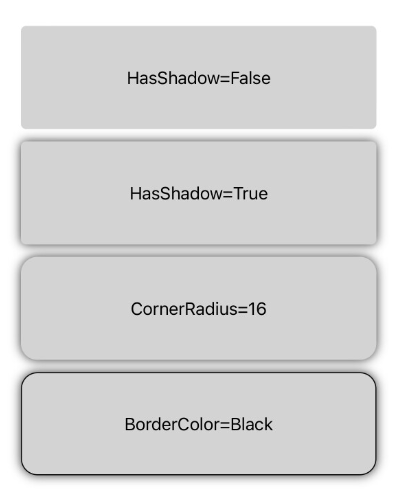
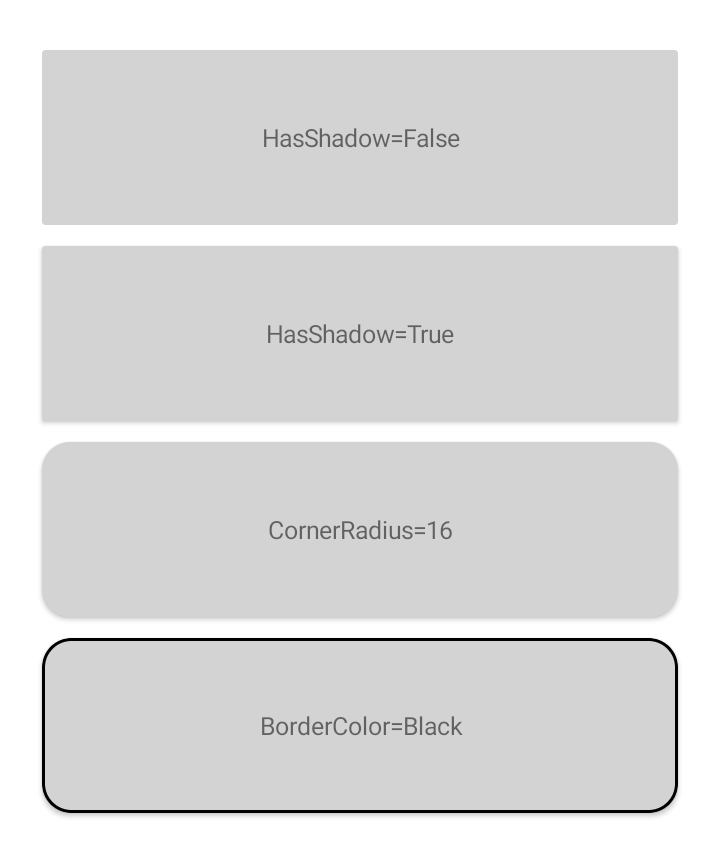
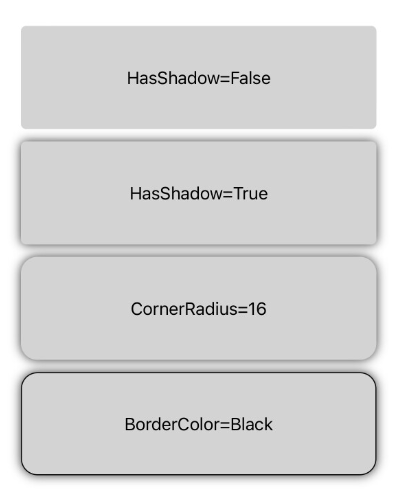
    The solution was to bite the bullet and to begin replacing these Frames with an equivalent Border. This is fairly straightforward and you can create a style to set your Borders up with the same appearance. Below is an example of some standard Frame appearances, in a moment we’ll look at how to recreate each with the Border control.

    iOSAndroid
    Xamarin Forms Frame appearance

    The first thing to notice is that the default appearance does vary depending on platform. Shadows seem to be barely noticeable on Android but that may be dependent on the OS version used. By default the Frame control has a corner radius of 4, no shadow and a light grey border colour. In hindsight I should have picked a different example background colour!

    Heading to the Border

    Now we have a reference point we can recreate the same look using the Border control. When adding a Frame to a MAUI page the corner radius seems to have changed to 8 by default. To recreate the shape we have to specify the StrokeShape for the Border because this can be any Shape and by default will be a plain Rectangle. You can set this in XAML to a RoundRectangle and include the corner radius. The Stroke property defines the outline brush. Set the StrokeThickness to 1 to match the line style of the Frame.

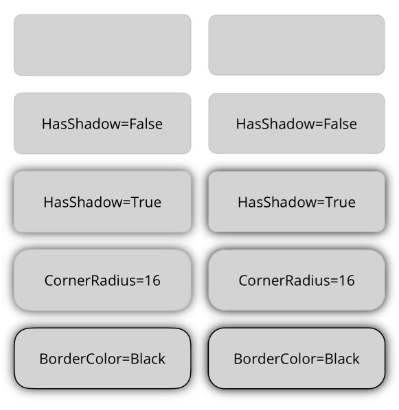
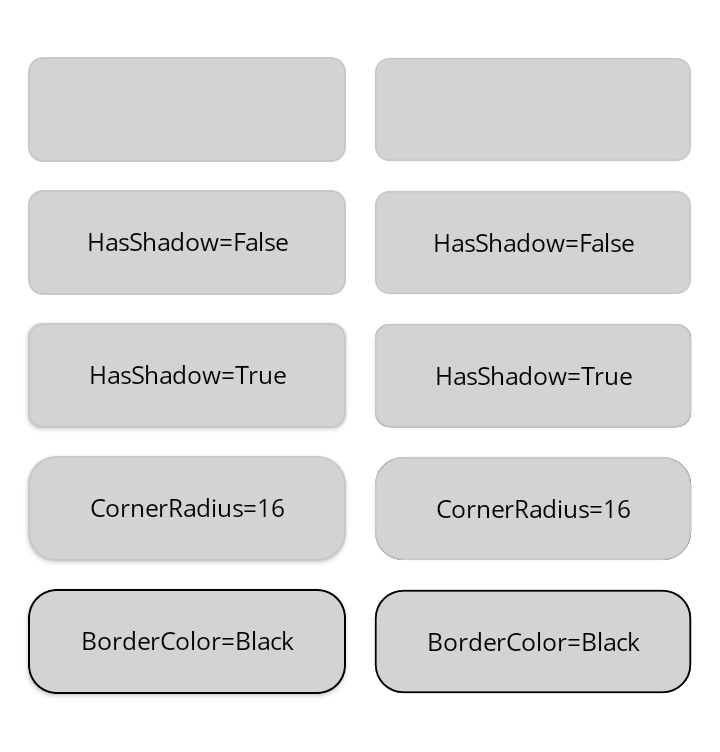
    Shadows are handled differently in MAUI so you can set the Shadow property on any class derived from VisualElement. Setting the Shadow to one with a radius of 5 creates an equivalent look to the Frame. The full XAML with a side-by-side comparison looks like this:-

    <?xml version="1.0" encoding="utf-8" ?>
    <ContentPage xmlns="http://schemas.microsoft.com/dotnet/2021/maui&quot;
    xmlns:x="http://schemas.microsoft.com/winfx/2009/xaml&quot;
    x:Class="MauiBorders.MainPage">
    <Grid Padding="16"
    RowDefinitions="60,60,60,60,60"
    ColumnDefinitions="*,*"
    ColumnSpacing="16"
    RowSpacing="16">
    <Frame Grid.Row="0" Grid.Column="0" BackgroundColor="LightGray">
    <Label Text="" HorizontalTextAlignment="Center" VerticalTextAlignment="Center"/>
    </Frame>
    <Border Grid.Row="0" Grid.Column="1" BackgroundColor="LightGray" StrokeShape="RoundRectangle, 8">
    <Label Text="" HorizontalTextAlignment="Center" VerticalTextAlignment="Center"/>
    </Border>
    <Frame Grid.Row="1" Grid.Column="0" BackgroundColor="LightGray" HasShadow="False">
    <Label Text="HasShadow=False" HorizontalTextAlignment="Center" VerticalTextAlignment="Center"/>
    </Frame>
    <Border Grid.Row="1" Grid.Column="1" BackgroundColor="LightGray" StrokeShape="RoundRectangle, 8">
    <Label Text="HasShadow=False" HorizontalTextAlignment="Center" VerticalTextAlignment="Center"/>
    </Border>
    <Frame Grid.Row="2" Grid.Column="0" BackgroundColor="LightGray" HasShadow="True">
    <Label Text="HasShadow=True" HorizontalTextAlignment="Center" VerticalTextAlignment="Center"/>
    </Frame>
    <Border Grid.Row="2" Grid.Column="1" BackgroundColor="LightGray" StrokeShape="RoundRectangle, 8">
    <Border.Shadow>
    <Shadow Radius="5"/>
    </Border.Shadow>
    <Label Text="HasShadow=True" HorizontalTextAlignment="Center" VerticalTextAlignment="Center"/>
    </Border>
    <Frame Grid.Row="3" Grid.Column="0" BackgroundColor="LightGray" HasShadow="True" CornerRadius="16">
    <Label Text="CornerRadius=16" HorizontalTextAlignment="Center" VerticalTextAlignment="Center"/>
    </Frame>
    <Border Grid.Row="3" Grid.Column="1" BackgroundColor="LightGray" StrokeShape="RoundRectangle, 16">
    <Border.Shadow>
    <Shadow Radius="5"/>
    </Border.Shadow>
    <Label Text="CornerRadius=16" HorizontalTextAlignment="Center" VerticalTextAlignment="Center"/>
    </Border>
    <Frame Grid.Row="4" Grid.Column="0" BackgroundColor="LightGray" BorderColor="Black" HasShadow="True" CornerRadius="16">
    <Label Text="BorderColor=Black" HorizontalTextAlignment="Center" VerticalTextAlignment="Center"/>
    </Frame>
    <Border Grid.Row="4" Grid.Column="1" BackgroundColor="LightGray" Stroke="Black" StrokeThickness="1" StrokeShape="RoundRectangle, 16">
    <Border.Shadow>
    <Shadow Radius="5"/>
    </Border.Shadow>
    <Label Text="BorderColor=Black" HorizontalTextAlignment="Center" VerticalTextAlignment="Center"/>
    </Border>
    </Grid>
    </ContentPage>
    iOSAndroid
    MAUI Frame and Border appearance

    As mentioned at the start, if you have a standard look you can define these properties in a style and apply to Borders throughout your app. Because the border is a more flexible control you have a lot more options around the shape and the outline of the control. For example even when sticking with the RoundRectangle you can specify individual corner radii and the outline stroke can be a gradient rather than a solid colour.

  • Farewell Tasks for Alexa

    Just over four years ago I released a free Alexa skill to synchronise your Microsoft To-do list with Alexa’s own lists. Sadly any effort to create an add-on for another product usually ends in either the product getting “sherlocked” or a required API being deprecated. This time it was the latter. Amazon have deprecated their List Management API and it will stop working on 1st July. There is no alternative API to use, as was the case when Microsoft deprecated their Office APIs and moved to Microsoft Graph, so this really is the end of the road.

    The skill has been hidden from the skills marketplace but will continue to function for existing users for another week or so, then I will shut down the Azure services and it will be final.

    While I won’t miss the support headaches I did find it an interesting learning experience, not only getting to grips with Microsoft Graph and its intricacies, but also coding for Alexa using .NET which I couldn’t have done without the excellent work by Tim Heuer and Steven Pears.

  • Learn WinUI 3 2nd Edition

    Learn WinUI 3 2nd Edition

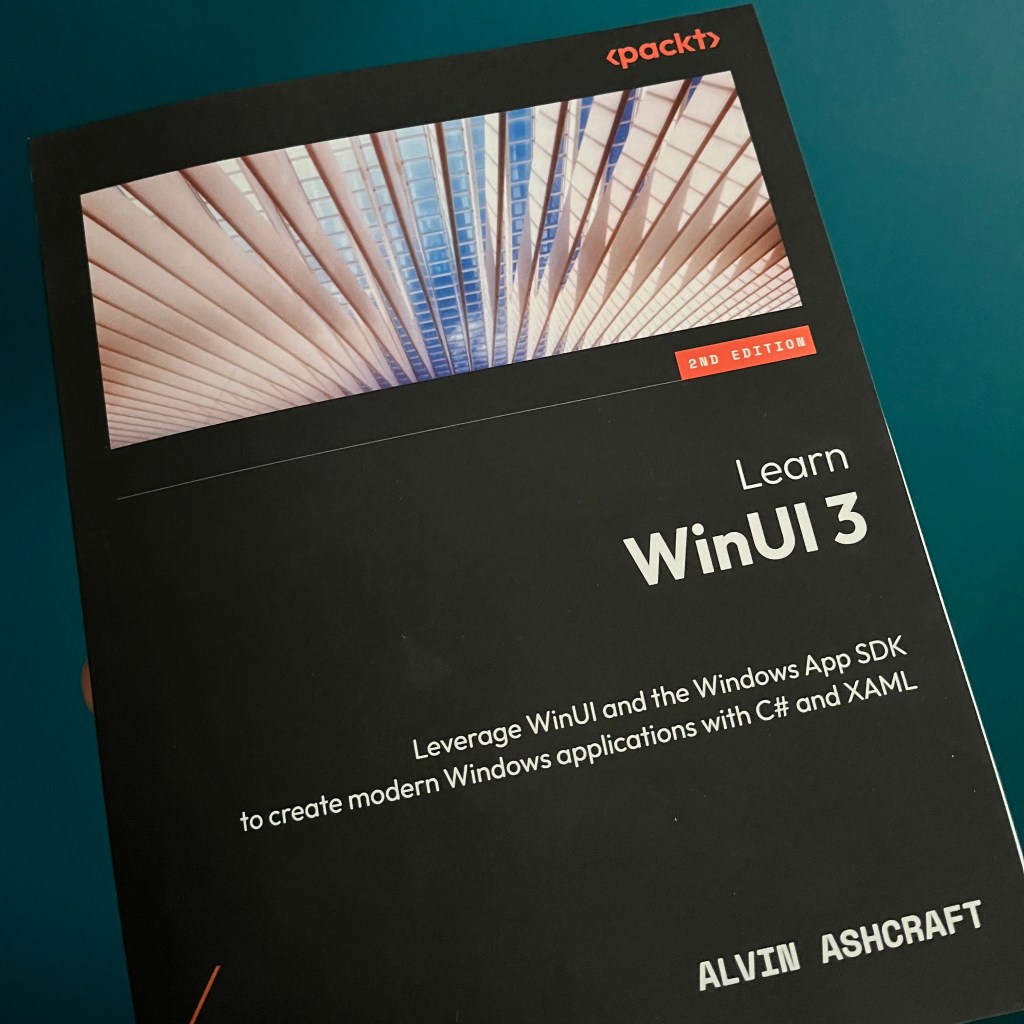
    I received a physical copy of Alvin Ashcraft’s new WinUI book last week. I had the pleasure of being a technical reviewer for the book and it has been great to see it taking shape from the early chapters on WinUI history and core concepts through to delivering your completed app in the Microsoft Store. Along the way it even has chapters on interoperability with Blazor and going cross-platform with Uno. This allows you to apply the WinUI skills you learn throughout the book to a wide variety of device types.

    I highly recommend it if you are interested in building apps for Windows and beyond using the latest XAML stack, fluent design and Windows SDK.

    More details are available on the Packt website. It’s available through all the usual physical and online book sellers.

  • Asking for Permission

    Asking for Permission

    I’ve been asked a number of times about the process to ask for Bluetooth permission for your app. I’ve been meaning to create something reusable for some time but it has languished on the To Do list for rather too long. I recently noticed that as of .NET 8.0, MAUI will incorporate a Bluetooth permission which simplifies the process for asking for permission in your app in a clean cross-platform way.

    I used this as an opportunity to refactor the library that I had started so I could create the same pattern for Xamarin Forms and .NET MAUI 7.0 so you can get started with it now and then switch to the in-box equivalent when you update your code. You can request permission with a single line of code:

    PermissionStatus status = await Permissions.RequestAsync<InTheHand.Bluetooth.Permissions.Bluetooth>();

    Today InTheHand.Bluetooth.Permissions went live on NuGet and the source is part of the existing 32feet.NET project. You can use this with either the Bluetooth Classic or Bluetooth LE libraries.

    It provides a simple way to request permission, which on some platforms won’t do anything noticeable but on others, such as Android, it will correctly prompt for permission as long as you’ve set up your manifest correctly.