Category: Bluetooth

  • 12 Days of Bluetooth – #1 Introduction

    I thought I would set myself the challenge of blogging about Bluetooth between now and Twelfth Night. I’m going to look at 12 topics covering the technology, the various services and capabilities as well as, of course, referencing how 32feet can help you use the technology.

    What’s in a Name?

    We probably all know the origin of the Bluetooth name – It comes from the nickname of a Norwegian king with severe dental problems. However, the actual technology was the result of collaboration between Nokia, Ericsson and Intel in the late 1990s to create a short-range radio technology for connecting devices. The Bluetooth name was only intended as a codename, but it stuck thankfully, rather than a number of bland product names suggested. Even the logo was created from Nordic runes representing King Harald’s initials.

    On the Air

    Bluetooth uses the unlicenced 2.4Ghz band. It uses Frequency-Hopping which helps to avoid interference and make it more difficult to jam or intercept the signal. A lot of how Bluetooth works at the radio level follows on from a technique developed by Hollywood actress Hedy Lamarr and composer George Antheil in the 1940s. They had designed a technique for sending secret messages to radio-guided torpedoes. The US Navy rejected the technology but seized it as “alien property” as Hedy Lamarr was an Austrian citizen at the time. It then got “lost” and not rediscovered again until the 1960s.

    Version 1.0

    The Bluetooth 1.0 specification was published in 1999. Primarily supporting serial port connections wirelessly and with a throughput of just 721 kbps and a range of 10 metres (32 feet) it nevertheless provided a first step on the long journey to today’s capabilities. It would go on to replace the almost ubiquitous IrDA ports found on phones at the time which could be used to exchange contacts and other files, and support ever higher audio quality.

    Once Again with Less Energy

    In 2013 with Bluetooth 4.0 a new Low Energy mode to provide a much more efficient way of working with intermittently active devices. A whole separate set of service specifications exist for Bluetooth LE and each has one or more characteristic which represents a logical value. These can provide read, write and notify functionality. The latter of which allows devices to re-establish a connection to notify when a value changes, rather than the old approach of using a constantly open data stream.

    Bluetooth and .NET

    32feet is a .NET library for working with Bluetooth and related personal area networking technologies. When I created it in 2003 it originally contained Bluetooth serial support for Windows CE and desktop Windows along with IrDA and OBEX (Object Exchange). More recently the library has been modernised and Bluetooth LE added, along with support for more platforms. If you would like to get involved there are plenty of opportunities to contribute to the code or documentation as the project expands to new device platforms and functionality.

    Coming Up

    Next time we will look at how Bluetooth devices are discovered and identified.
  • New 32feet.NET Documentation

    New 32feet.NET Documentation

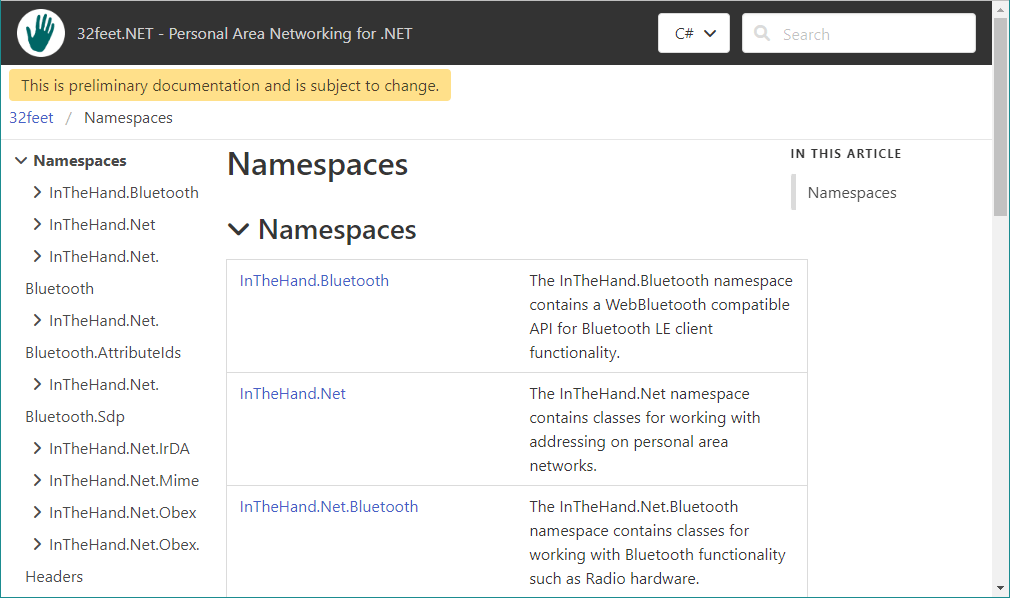
    I managed to complete one of those jobs I’d been meaning to get around to for sometime and to celebrate getting the to-do list down to triple figures I thought I’d share the good news!

    Many years ago I built the documentation for 32feet.NET combined with the other libraries I had at the time:-

    Pontoon – UWP APIs for multiple platforms – a kind of Uno light of its day

    InTheHand.Forms – Collection of various add-ons for Xamarin Forms including the original MediaElement.

    Since these are both essentially obsolete, and the 32feet documentation is now very out of date, I needed to completely refresh it. Ideally I’d have setup the magical DocFX and had the whole process automated to generate documentation on each release but, of course, perfect is the enemy of done. Instead I went back to my trusty Sandcastle Help File Builder and created a project to bring in all the current 32feet libraries (there are currently 5 with at least 1 more on the way). The latest docs should be much clearer and focus entirely on the current APIs. I’ve left the “preliminary” tag on for now and will be working through to fill in any gaps highlighted in the docs. If you have any specific bugs/suggestions please raise an issue in the GitHub project and tag it with the “documentation” topic.

  • Home Assistant Adds In-box Bluetooth Support

    Yesterday’s release of Home Assistant 2022.8 adds built-in Bluetooth support. This allows multiple integrations to share common functionality and (important for non-Linux platforms) share a single Bluetooth adapter.

    In the release are five integrations built on top of this support, along with Apple HomeKit support for Bluetooth devices (even if you don’t have an Apple device).

    For more information on the integration and details of supported Bluetooth adapters see the integration page.

  • Bluetooth for MAUI

    Quick update today as I’ve just published new builds of InTheHand.BluetoothLE and InTheHand.Net.Bluetooth to NuGet which support the new .NET 6.0 MAUI target platforms. There were some small code changes to make in the iOS/macOS APIs and on Android I had to replace the Xamarin.Essentials reference with the new Microsoft.Maui.Essentials package. That change was very straightforward – just adding a project property and changing the using namespace!

  • When is a BluetoothRadio not a BluetoothRadio?

    A user of 32feet pointed out a change in behaviour between version 3.5 and 4.0. If you disabled the Bluetooth radio after initially getting a reference to the default radio it would still show the Mode as Connectable/Discoverable. I looked into the code and the 3.5 code was doing an additional check – calling BluetoothGetRadioInfo and if this call failed it would return PowerOff. However I then found that this call succeeds and so it still shows an active mode incorrectly. I believe this change probably happened around Windows 8 because the mechanism for disabling the radio changed around this time. However I don’t have a back catalogue of PCs to test this theory.

    I had to go back to the drawing board – how do we discover the state of the radio – the API returns successfully and all the flags indicate it is active. The lower level IOCTL call behaves the same too. However if you try and enumerate the BluetoothRadios again* it fails and returns nothing because to this API a disabled radio is the same as no radio at all. So we now have a workaround – when getting the Mode we check to see if there is still a radio present – if not we return PowerOff. Version 4.0.28 includes this fix.

    * Enumerating the radios is a bit of a misnomer – although the API introduced back in Windows XP allows for enumerating multiple radio devices, Windows has only ever allowed one at a time – if you attach a second radio it disables the first in device manager. So while you can have multiple radios (with potentially different pairing information) only one can be active at a time.

  • 32feet for WinRT

    Currently the 32feet Bluetooth Classic library for Windows is build around the Win32 API to ensure support for Windows 7 as well as theoretically supporting prior versions no longer officially supported. It has always been my aim to implement the library using the newer WinRT APIs in order to support consistent functionality for apps running in the UWP sandbox as well as future-proofing the library.

    In version 4.0.27 the UWP implementation includes BluetoothRadio, BluetoothClient, BluetoothDevicePicker and BluetoothSecurity. The BluetoothListener is not implemented at the moment. BluetoothRadio can read the mode but not set it currently as it requires a bit of trickery to ask for permission on the UI thread. This however means most of the functionality is now available from UWP apps including Hololens. Once there is a clean way to add this implementation to the desktop Windows dlls it’ll make it easier to support other Windows variants which don’t have all the Win32 APIs – like IoT.

    If there is some functionality you’d like to see added please get involved in the GitHub issues to discuss and I’ll happily accept pull requests to continue enhancing the libraries.

  • 32feet.NET on .NET 5.0 and Above

    Version 4.0.22 of InTheHand.BluetoothLE (and 4.0.25 of InTheHand.Net.Bluetooth for Rfcomm) marks an important milestone. It adds a .NET 5.0 specific build which is important because the approach used to access WinRT APIs has changed since .NET Core 3.x and so the library was not compatible with later versions. Now it will run on Windows 10 on .NET 5.0 and 6.0.

    This release also adds some new functionality which goes beyond the WebBluetooth API on which it is based. You can now read the negotiated MTU (Maximum Transmission Unit) for the current connection. Importantly it also requests a higher than default value on Android. The reasoning behind this is that generally platforms use a value in the region of 512 bytes but Android starts with a default value of 20 bytes. Prior to this update you had to write platform specific code to change it, but now we request 512 bytes on connection and whatever value is negotiated (it may still be lower than this depending on the radio device and remote peripheral) is readable from the Mtu property.

  • Bluetooth and Windows 11

    It’s still early days for Windows 11 but pre-release API documentation is available on Microsoft Docs and it gives some hints of new functionality for developers:-

    BluetoothLEDevice gains functionality to request preferred connection parameters. These include minimum and maximum connection interval, latency and link timeout. If these seem a bit complex to set individually there are three static properties which give you a choice of optimizing for throughput, power consumption or a balance in the middle. It also has the ability to query the Bluetooth PHY (physical layer) used which (if both devices support Bluetooth 5.0) can be either Coded (smaller data but longer range), 2M (larger data) or 1M (same as Bluetooth 4.x). It doesn’t currently seem to support requesting a preferred PHY.

    I’m looking at how these can be incorporated into 32feet.NET given that there is currently support for PHY on Android only.

  • Bluetooth Virtual Sniffer for Windows

    I only just found out about this but Microsoft released a packet sniffer for Bluetooth on Windows 10 back in February. This is incredibly useful for debugging and is something I’ve been craving for some time. Previously I’ve been able to analyse packets from Android using Wireshark and now we can view activity between Windows and another device.

    I’m desperately hoping this provide some clues to the constant “Unreachable” errors when trying to communicate with an iPhone which Windows Settings acknowledges is currently connected…

    You can download the Bluetooth Test Platform here.

  • What’s in a BluetoothLEDevice.Name

    I’ve noticed an odd behaviour when creating a BluetoothLEDevice from a found device id. I’m not doing anything special, just retrieving paired devices and then trying to access the relevant BluetoothLEDevice. In common with all Windows device searches (whether by Picker or programmatically with DeviceInformation.FindAllAsync) you receive a DeviceInformation which contains the name and unique id (an opaque device path).

    If you search for paired BluetoothLEDevices the returned DeviceInformations contain the valid name and id of the device. When you use BluetoothLEDevice.FromIdAsync() you get back a working BluetoothLEDevice instance but the Name is of the form “Bluetooth nn:nn:nn:nn:nn:nn” which is slightly less than useless. It turns out that Windows isn’t suffering from Amnesia and the actual display name of the device is accessible from BluetoothLEDevice.DeviceInformation.Name. I was scratching my head for a while over the logic of this but at least now I’ve been able to put in a workaround in InTheHand.BluetoothLE 4.0.18. The BluetoothDevice.Name now shows the same name as Windows shows in the UI and so it behaves the same as the other platform implementations!