I recently got a Lumia 930 and was looking for a simple car holder/charger for it. I saw the CR-201 (which is updated from the CR-200 and advertised as compatible with the 930) and thought it would be perfect because:-
1) It has wireless charging so just pop the phone in, no fiddling with USB cables
2) It looks nice
However it doesn’t really fit the 930 and so this leads to a couple of issues – The clamp mechanism grabs the camera button, the sticky cable ties don’t stick to any material other than the plastic film they ship with and the wireless charger doesn’t deliver a charge capable of supporting charging while using the holder. No doubt this latter issue is also due to the size/positioning just not being right. Sadly it’s only after you discover these issues yourself you then find other reviewers online have encountered the same problems. So it’s going back and I’m looking for an alternative.
Last month I posted the latest “charming” helper for Windows development which is a Windows Phone (8.0 or Silverlight 8.1) ProgressRing with the same appearance as its big Windows counterpart.
Today I’ve just pushed an update to NuGet which improves the flexibility of the control by allowing you to override the Foreground colour of the rotating dots. The default is still to use the phone’s accent colour so this is what you’ll see if you don’t specify the Foreground brush explicitly. Details here:-
When I first setup this phone and swapped my account over to a new nano-SIM I received a message from O2 that my data and picture messaging settings couldn’t be automatically setup (don’t you just love progress). I had to get the manual settings and now the phone is working as expected. However I thought I’d post them here because they are different to ones I’ve seen posted before and the instructions sent by O2 actually are for older versions of Windows Phone and the names of some items have changed. So here goes…
Tap Settings > mobile + SIM
Tap SIM Settings
Set “Manual Internet APN” to On
Tap “add Internet APN” (or “edit Internet APN” if you tried already). Set the following fields:-
APN = “mobile.o2.co.uk”
Username – “o2web”
Password = “password”
Authentication type = PAP
Proxy server (URL) – leave blank
Proxy port – leave blank
IP type = IPv4
Tap the Save button
For MMS tap the “add MMS APN” or “edit MMS APN” button
In Silverlight 8.x you can use the Toolkit Rating control to provide standard star rating functionality in your app. If you’re moving to a Windows Phone 8.1 App project you can’t use the Silverlight based toolkit and there isn’t a native control to replace it.
If you’ve worked with Windows Store apps you’re probably familiar with the Callisto toolkit – a set of controls for Windows Store apps that brought things like settings flyouts (prior to them being rolled into the Windows Runtime) and a rating control. You can use this control within a Phone app with one caveat. If you try to reference the NuGet package for Callisto it will tell you it contains no library for Phone apps. However if you are using a Universal project this is easy to overcome:-
Add the Callisto NuGet package to your Windows Store app
In your Phone project select Add Reference and browse to the packages folder in the root of your solution
Locate Callisto.1.4.0/lib/netcore451 and select Callisto.dll
Bingo you can now add the rating control to your phone project.
I haven’t tested all the functionality in a Phone project so it is possible there may be some items which don’t work on Phone…
Hopefully in a future update to the Callisto NuGet package it will include a dll for Phone 8.1 apps too to avoid these extra steps…
Charming Share provides a share API for Windows Phone 8.0 projects which mimics the built in support in various system apps and exposes an API which is the same as that available in Windows 8.1 and Windows Phone 8.1. Now that we have a full Sharing feature in Windows Phone 8.1 we can take advantage of this from both AppX and Silverlight 8.1 projects. But what if you need to continue using a Silverlight 8.0 project?
Well the answer is to use Charming Share as it is now smart enough to determine when it is running on an 8.1 device and defer to the system Sharing feature. To quickly illustrate here are screenshots from the same 8.0 project running on both 8.0 and 8.1:-
The eagle-eyed amongst you will notice the 8.1 list is quite sparse – this is because it’s taken from the Emulator which has no email accounts or social apps installed. But imagine Facebook etc and any other third-party apps appearing in this list.
In terms of look and feel, I don’t have any plans to change the look of the 8.0 sharing screens – these are designed to match the system as this is how the sharing features appear in Windows Phone 8.
Now that there are so many platforms to cover I’ve changed the main documentation page into a feature matrix so it is easier to compare functionality across platforms and app models
In the latest release of Charming Share which is now live on NuGet I’ve added a new Clipboard API.
For Windows Phone 8 and 8.1 Silverlight apps this wraps the existing Silverlight functionality. For Windows Phone Store 8.1 applications this provides a workaround to the lack of any Clipboard API on that platform. The library provides a Windows-style API (differing only in root namespace) to make it easier to share more code across projects.
As with the existing Silverlight model the Clipboard is “write-only” with only the user in control of pasting the contents into a TextBox. It exposes two static methods – SetContent and Clear. I haven’t yet updated the documentation on the project site but these two methods are fairly straight-forward. Unlike “big” Windows the clipboard can only store plain text (again this is familiar from the Silverlight model) so will accept data packages containing text or Uris.
In order to facilitate this functionality on non-Silverlight apps on 8.1 there is of course a gotcha. It requires a separate app to be installed and there is a small visual transition while this app handles the request. This isn’t ideal but if there are some cases where you need Clipboard it is a necessary evil and by matching the Windows Store API we have hopefully provided a clean transition should this missing feature be added in a future release.
Why would I want another app? When building this solution I though about how this add-on app could provide additional value and so it takes advantage of a number of Windows Phone 8.1 features. It doesn’t use any online services so the data you share with it never leaves the device. It’s a simple free app called “Clipboarder” and I encourage you to check it out (and provide feedback!).
Share Target: You can share text and Uris to the clipboard from other Windows Phone 8.1 apps which are Share sources.
Share Source: If you run the app from the programs list you can enter arbitrary text and either copy to the clipboard or Share with other Windows Phone 8.1 targets.
I’m just passing this on because I’ve been stung by a couple of gotchas introduced with SL8.1 which only seem obvious after you’ve fixed them:-
If your application implements a custom Uri scheme you probably think you just have to add it to your WMAppManifest.xml as you always used to and the job is done. Well no, you see Silverlight 8.1 apps have two manifests – they also have a Windows Store Package.appxmanifest and this is the one the store uses. So if you have an app which handles say “myapp:” and you run an app which calls this Uri the store opens on the phone and displays no results. If you have the app installed then the association works as expected. You need to add the protocol to the Declarations tab of the Package.appxmanifest editor and submit an update. Once this is submitted it starts working even before your new version is necessarily available…
This leads onto the second issue. I always use the WMAppManifest.xml version and increment it and store it in source control. When I submit an 8.0 update I find it frustrating that the store doesn’t pick this up and I have to manually input it. If they don’t match my update prompter gets very confused (but that’s another issue). When I submitted a new SL8.1 app I was impressed that this version box is now greyed out and will populate the value from my submitted package. What I failed to notice when doing an update was that I now need to make sure I update both the WMAppManifest.xml and the Package.appxmanifest versions to keep these in step as the store uses the value from Package.appxmanifest…
If you haven’t already heard, we are running a developer event for Windows app developers in Manchester on the 16th and 17th May as part of the global //publish/ event. Pete has more details on his blog post here so I urge you to take a look and then
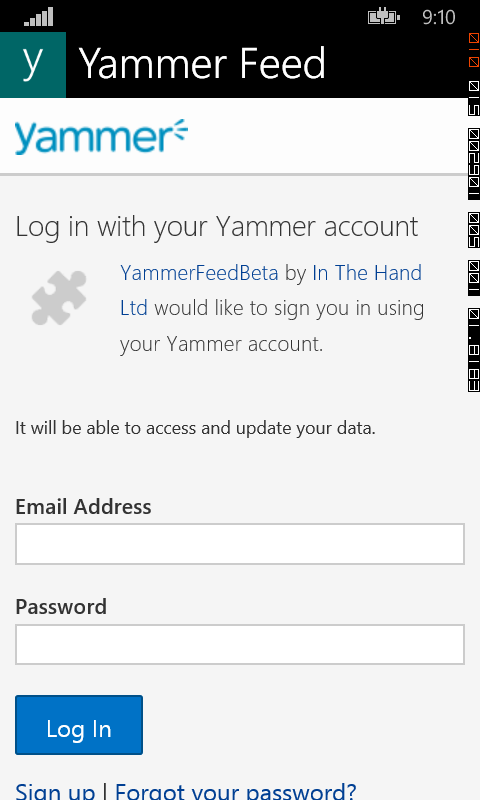
In Windows Phone 8.1 both the Silverlight and Windows App programming models introduce the WebAuthenticationBroker class. This is inherited from “big” windows but with a change to reflect differences in the app model. Rather than operate as an asynchronous method within the context of your app there is instead an AuthenticateAndContinue method. This closes your app and launches the authentication window in a separate process, returning to your app upon completion. You will find that AuthenticateAsync will throw an exception even though the method is in intellisense and not marked as obsolete. You then need to hook the ContractActivated event of your application instance to determine the result when your application is relaunched. This flow is used not just by the WebAuthenticationBroker but also file pickers and other contract operations.
In Windows Phone 8.0 projects I built my own WebAuthenticationBroker to match the desktop API and with the release of Windows Phone 8.1 I tweaked the look slightly to match and released it as part of the Charming Apps for Windows Phone project. You’ll find this in NuGet here. You can then add OAuth with a couple of lines of code e.g.:-
WebAuthenticationResult result = await WebAuthenticationBroker.AuthenticateAsync(WebAuthenticationOptions.None, requestUri, callbackUri);
if (result.ResponseStatus == WebAuthenticationStatus.Success)
{
   // parse the token here (implementation specific)
}
The dialog displays the app name and uses as much space as possible for the web content:-
WebAuthenticationBroker
Some caveats – I’ve only used it with a couple of OAuth providers so I can’t guarantee it will support every variation. As with the Microsoft implementations you still have to do some manual parsing of the returned data to get your token. It doesn’t support WebAuthenticationOptions (other than None) and doesn’t read the HTML meta-tags Microsoft introduced to display a logo or background colour. It will however use the app logo and title as the built-in component does on 8.1.
While this does support 8.1 I would suggest that if you are starting a new project you use the built in component and ContractActivated event, if you want to target both 8.0 and 8.1 then you can use this component and the user experience is consistent with the built-in experience.



 In The Hand Ltd