In the last post on “My” functionality I showed you how to get started adding the My Extensions to your project. In this post I have assembled a detailed tree of all the “My” functionality added in Mobile In The Hand 4.0.
- My
- Application
- Culture
- Info
- AssemblyName
- CompanyName
- Copyright
- Description
- DirectoryPath
- ProductName
- Title
- Trademark
- Version
- UICulture
- Computer
- Audio
- Play()
- PlaySystemSound()
- Stop()
- Clipboard
- Clear()
- GetData()
- GetDataObject()
- GetImage()
- GetText()
- SetData()
- SetDataObject()
- SetImage()
- SetText()
- Clock
- GmtTime
- LocalTime
- TickCount
- FileSystem
- CombinePath()
- CopyDirectory()
- CopyFile()
- CreateDirectory()
- DeleteDirectory()
- DeleteFile()
- Drives
- FileExists()
- GetDirectories()
- GetDirectoryInfo()
- GetDriveInfo()
- GetFileInfo()
- GetFiles()
- GetName()
- GetParentPath()
- GetTempFileName()
- MoveDirectory()
- MoveFile()
- OpenTextFileReader()
- OpenTextFileWriter()
- ReadAllBytes()
- ReadAllText()
- RenameDirectory()
- RenameFile()
- SpecialDirectories
- CurrentUserApplicationData
- MyDocuments
- ProgramFiles
- Programs
- Temp
- WriteAllBytes()
- WriteAllText()
- Info
- AvailablePhysicalMemory
- AvailableVirtualMemory
- InstalledUICulture
- OSPlatform
- OSVersion
- TotalPhysicalMemory
- TotalVirtualMemory
- Keyboard
- SendKeys()
- Name
- Ports
- OpenSerialPort()
- SerialPortNames
- Registry
- ClassesRoot
- CurrentUser
- GetValue()
- LocalMachine
- SetValue()
- Screen
- Audio
- User
- Name
- Application
A full online library of class documentation for all this and more is available. For more information about Mobile In The Hand see the product page.
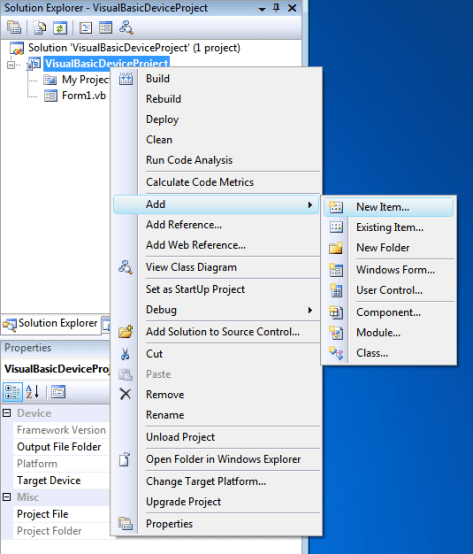
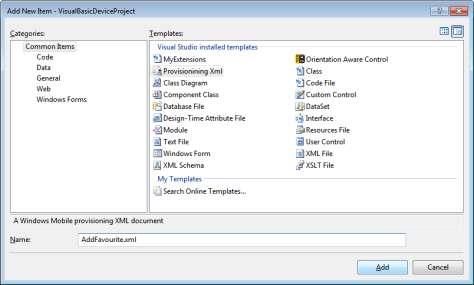 In this example I have called the file AddFavourite.xml (no prizes for guessing what task we will be performing). The document is created with a skeleton provisioning document. Notice the namespace is provided which links to the schema we installed for you.
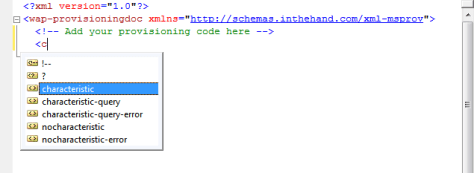
  You can now add the required code between the wap-provisioningdoc tags. As you start to type the IntelliSense will suggest valid elements for you based on the schema:-
  This makes it very easy to quickly build up a complete document:-
 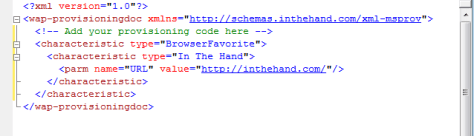 You can process a configuration document like this using the ConfigurationManager class. By setting the document as an embedded resource you can use the following code to load it and pass it to the ConfigurationManager:-
 For more information about the library see


