Use Your PC To Talk When You Can’t
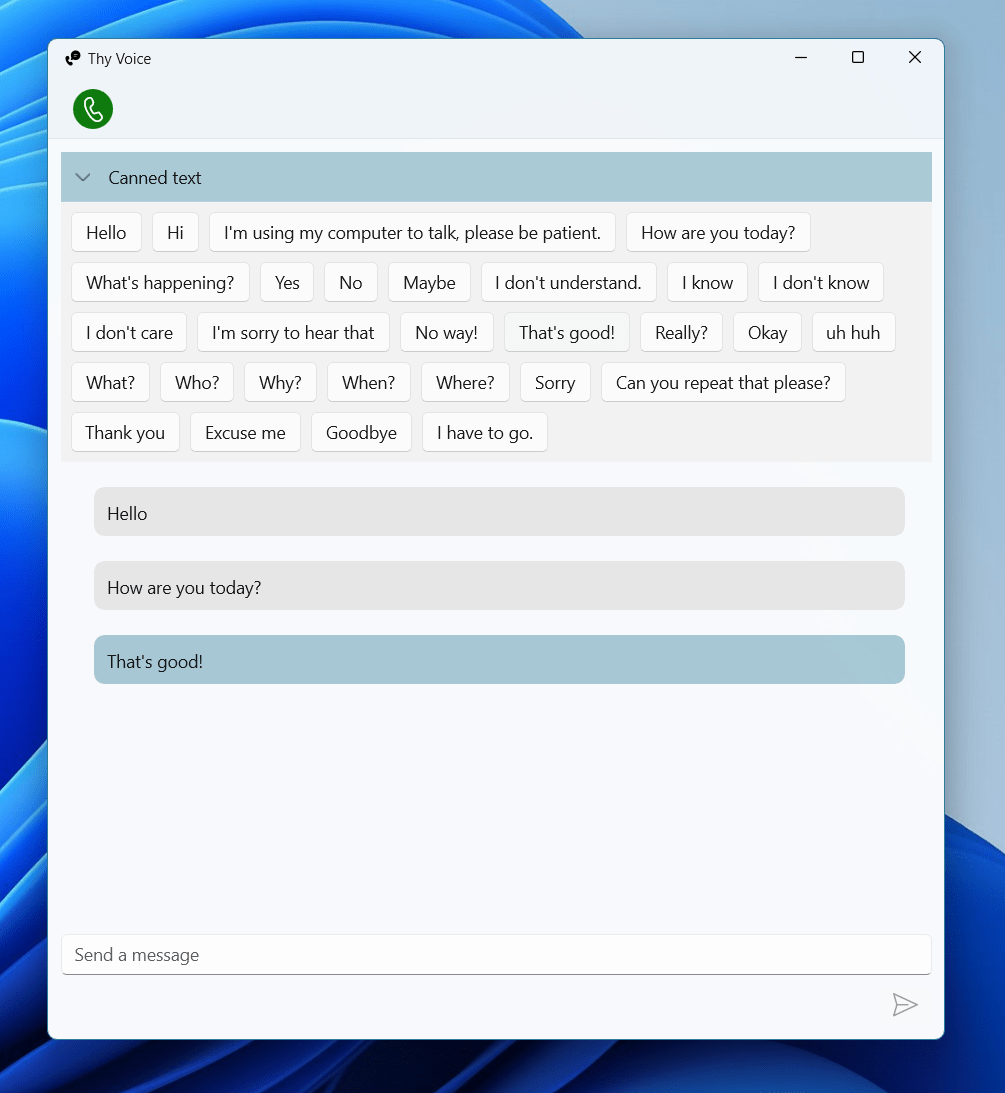
Thy Voice, allows you to use text to talk when you might not be able to use your own voice. There are many reasons why a user might not be able to use their voice, either temporarily or permanently. This type of tool is known as Augmentative and Alternative Communication (AAC).
The user interface is created with WinUI 3.0 and designed to match the modern look of Windows 11, rather like the messaging feature in Phone Link or a Teams chat. As well as supporting live text entry you can create a collection of reusable phrases to speed up entry. Some examples are pre-loaded in the beginning based on some existing common messages for AAC users.
Since only one app can be registered to use a specific hands-free device, I didn’t want to reinvent the wheel and break existing Phone Link features so Thy Voice sits alongside your existing phone software (Phone Link or Thy Phone) and can detect when a call is active. You make and receive calls through your existing app, you can decide whether to use Thy Voice to conduct the call via text.
The app works with mobile phones connected through either Microsoft Phone Link or our Thy Phone app.

 In The Hand Ltd